May 9, 2015

The best way to access the camera from a locked Windows 8.1 Tablet

7
SHARES

One of the biggest problems that most of the people tend to face is that How to access Camera from Locked Windows 8.1 Tablet. Then how do you get to click some of the most amazing pictures and images without unlocking the phone? Though this is a feature that tends to be available in a few handsets but is the feature available in the Windows 8.1 tablet as well is something that many of us were not sure about. However this article will tell you exactly how to keep your Windows 8.1 tablet locked and still be able to use the camera function and click some stunning shots.

The best way to access the camera from a locked Windows 8.1 Tablet

Procedure to switch on the camera

Here is the detailed way about how to unlock the camera function of the Window 8.1 tablet without actually switching on the tablet.

  • Press the power button to the locked screen of the windows tablet. This will enable you to see the screen wherein it is locked.
  • In order to get access to the camera what you need to do is to swipe the screen from top to bottom motion. This is standard procedure and will show you a great option to start the camera feature without unlocking the tablet.
  • What you see is a black screen and on the left hand side there is a camera app button on the left hand side of the screen. Tap on the sign that appears on the left side to enable the feature completely.
  • Now you can start clicking images with all the controls available to you as opposed to the normal mode wherein the swipe action of the screen and the camera app can be the only way to use the app in the tablet.
  • On the left hand side you can also see that there is an icon marked unlock. This can be used to unlock the tablet as opposed to the normal way of doing it.
  • Tap it, unlock it and you can see the tablet in the way that you are supposed to use it in the normal sense.
  • On the screen there is the sign in Press it and sign in as usual to enable yourself to use the tablet completely as you normally would.

If you are a person who is crazy about taking images from a Windows 8.1 tablet which offers you stunning features to enhance your images and do a lot of changes to the images, then the post should be the perfect for you. Tell us what you think about this cool feature of being able to click awesome images from your Windows 8.1 tablet without unlocking your phone even once. You can log on to our site and send in your comments. Is there any other feature that you feel should be featured here in the site? Then do let us know and we will surely feature it in our website.

post from sitemap

Windows 10 Technical Preview Build (10051) available for phones

On April 10, Microsoft released the Build 10051 of the Windows 10 Technical Preview for phones to the Fast ring. This new build support more windows phones to upgrade to newer version of downgrade to lower version of window phones. There are some issues with devices like Lumia 520 devices when trying to roll back to Windows Phone 8.1 using the Windows Phone Reset Tool. So Microsoft paused the build availability for these devices temporarily while we investigate the issue and work with customers who have reported problems.

Devices supported with this build:

So, let’s start with the good news: a TON more devices are supported for this build, and we’re excited for Insiders with these devices to start using Windows 10 and sending us feedback.

  • Lumia 1020
  • Lumia 1320
  • Lumia 1520
  • Lumia 530
  • Lumia 530 Dual Sim
  • Lumia 535
  • Lumia 620
  • Lumia 625
  • Lumia 630
  • Lumia 630 Dual Sim
  • Lumia 635
  • Lumia 636
  • Lumia 638
  • Lumia 720
  • Lumia 730
  • Lumia 730 Dual SIM
  • Lumia 735
  • Lumia 810
  • Lumia 820
  • Lumia 822
  • Lumia 830
  • Lumia 920
  • Lumia 925
  • Lumia 928
  • Microsoft Lumia 430
  • Microsoft Lumia 435
  • Microsoft Lumia 435 Dual SIM
  • Microsoft Lumia 435 Dual SIM DTV
  • Microsoft Lumia 532
  • Microsoft Lumia 532 Dual SIM
  • Microsoft Lumia 640 Dual SIM
  • Microsoft Lumia 535 Dual SIM

Unfortunately there is a problem with the expansion in certain devices (930, 640XL and icons) that makes the user interface too small to be usable, and we need to add code to support new scale thresholds for these devices.

Getting Started with Windows Insider Program:

Instructions on how to join the program and get phone set up on the website of Windows Insider. Be sure to read the instructions carefully so you can upgrade with ease and comfort.

If the phone is already on Windows 10 Technical Preview, all you have to do is go to Settings> Applications and made recovery update> Update Phone> and check for updates. We push on that ring the building as fast today. To change from fast to slow Ring, just go on Insider Windows application on your phone and access your MSA and change rings.

Here is What’s new in this Build:

1. Project Spartan: Project Spartan is not the default browser, and exists side-by-side with IE11. You can find it in the All Apps list and pin it to your Start Screen from there.

2. New mail and calendar apps: Outlook Mail and Outlook Calendar are the new built-in mail and calendar universal apps for Windows 10.

3. New Phone and Messaging apps: The Messaging app has a new visual design. You can also easily upgrade from a messaging conversation to a voice call with one click of the phone icon in the new app bar

4. New people app: The new universal People app has a new visual design but will continue to be the comprehensive list of all your contacts across the services you care about such as Exchange, Outlook.com, Gmail, Facebook, etc.

5. New Maps app: The first preview of our new universal Maps app on phone is now available. Maps offers you the features and tools you need to explore and navigate the world.

6. Updated App Switcher: Discover the application switcher update by pressing the Back button on your phone to view recently used apps. They have added support for the landscape when called from an application that is seen in the landscape. For large phones like the Lumia 1520, they introduced a new network design so that you can be more efficient switching between applications. And they have also extended the duration of recently used applications 15.

post from sitemap

May 4, 2015

5 The hot technology stocks Buy


A little extra power in the gastrointestinal tract IT could be just to strong earnings fiver These ActionsIn 2015, the stock market continues to fall hard and the labor market continues to improve job seekers a paragraph Across America.

dollar sign keyboard tech stocks to buy 630 ISP 300x227 5 Hot Tech Stocks to Buy Now
Who laid the foundations esta possible by a resurgence in business technology companies such as gastro crawled in good times planned in advance.
The research firm Forrester said a few weeks ago "CIOs can confidently push the paragraph 2015 budget increases of 4 percent to 6 percent in terms of acquisition of technology goods and services"
The panorama is more depressed overall, but still gastro Technology International is moderate growth mode, too.
The conclusion is that companies that want to grow 2,015 need to invest in the last paragraph to technologies. Sometimes this is the data analysis, it is sometimes cybersecurity time that the software is cloud computing.
Palo Alto Networks Inc. (PANW)
PaloAlto185 5 Hot Tech Stocks to Buy Now
Palo Alto Networks Inc. (NYSE: PANW) is up over 15% from 1 January to 85% in the last 12 months thanks to a mayor of attention to cybersecurity.
And this while technology stocks currently manages A small loss, remember that arrived in 2012 and solo in public is largely in the growth mode. Idem If PANW invests in a large here, hoping to be consistently profitable next year, hay and many reasons to think sera as a success. Palo Alto Networks, ended fiscal 2012 of $ 255 million in revenue and is expected to reach some $ 880 million the year esta income - the best growth in three years 230%.
In addition, we Solido PANW a $ 1.1 billion balance Fence with cash and investments in the books, there is no risk of growth plans if running off the rails.
The product esta principal balance of cybersecurity is a firewall that protects raised a wide variety of businesses worldwide, trust companies as Motorola Solutions Inc. (NYSE: MSI) and Raymond James Financial, Inc. (NYSE: RJF) and as PANW continue doing events like Sony Corp (ADR) (NYSE: SNE) or hacking Anthem Inc. (NYSE: ANTM) approach to data breach means for maintaining a low seguridad gastro -oesophagien.
PANW or on its own merit is lifted or serums most attractive acquisition targets para other shares of the following year or technology company in the back.
Securities purchases of Accenture Technology Plc (ACN)
Accenture185 5 Hot Tech Stocks to Buy Now
Accenture Plc (NYSE: ACN) is a technology consulting firm that has been a tear since October, compared to 17% in five months, almost double the profitability broader market over the same period m .
He Weight De esta recent series of new records every time, is still valued with a nice lot of room to suffer in the coming months.
As recently noted Dan Burrows Graphics Fri look very Accenture A recent gold cross and now "ACN’s a performance period of past two months, rising 0.7% in March and April 2% The last decade on average. "
But Graphics: Besides the price alone story is hopelessly continue with the UN gastro-IT in 2015 is that companies continue to hire and expand. Thus informed Until version without income March 26 report to December was very strong and showed a rhythm in the upper and lower lines and growth in five to four business groups. This bodes well for quarterly reports Para One then do a few weeks.
ACN is the forward gain value is less than the S&P 500 versus 17 17.5 for the market in general - is not big discount UN, but at least one indicator that there is in the other Shares air bubbles Gas Technology. And while knew DIVIDENDS 2.3% is burning the house is higher than the average of 1.8% of S&P and now 10-year T-Note.
But the main reason to purchase ACN paragraph is not for dividends or business improvement - is the hope of a recovery in the permanent in Business Technology gastro Throughout 2015, companies invest in themselves ... do not Accenture hiring para home of high technology in order.
Purchases of technology stocks: Cisco Systems Inc. (CSCO)

Cisco185new 5 Hot Tech Stocks to Buy Now
Cisco Systems, Inc. (NASDAQ: CSCO) stock technology is a mega-cap stocks Many Fingers Purpose with more cakes. But the common theme between the different divisions Cisco're focus on technologies company information is contracts with some of the largest companies in the world.
And following m, CSCO tail also benefits from the increased spending of the Company in 2015.
CSCO shares also now offers with a certain advance on the value P / E of 12.4, well below the rate for S & P 500 dividends Cisco also offers 3% to about US $ 54 million in cash and investments.
Cisco establecida're steady there, capped with 140 billion dollar market and one of the brands of technology. But also it has the afternoon of growth that CSCO gains in November included the "stronger (tax) income in the history of Q1" according to a press release, and its leaders "clearly optimistic "reports RESULTS Following are a few weeks old in February.
Although Cisco UN to have lower performance in 2015, it is interesting to note EL Stock CSCO It was a big gap in February by gains on optimism, and investors more confidence in this giant release Technology Winning after a series formless quarterly Forte.
This! He now is the time invested für Cisco availability Book sign another top section.
Technology stocks shares a cart Fortinet Inc. (FTNT)
Fortinet185 5 Hot Tech Stocks to Buy Now
FTNT is the "Goldilocks" perfect social cybersecurity - not too big nor too small. It serves major clients, including the stock exchange Nasdaq OMX Indiana University, while growth indicators by adding to the coming year may impress.
It Unlike other actions in space, impressive front line of Fortinet experienced growth groom profitable comfortable use that are not in cash burn mode. 2014 income tax reached $ 770 million increased by nearly 80%, from $ 433 million in fiscal 2011 - the impressive growth rate of the Company, but was turning a profit ago many years.
This good performance FTNT MEANS this scam capitalized US $ 1 billion in cash and investments as well - especially zero debt.
Bears Fortinet Inc. You will notice that I had a quarterly report there is a hard day with the sliding action after the company reported a net profit would fall. But the details and seemed apparently those very INVESTORS No. Concerned is that it is of the population, more than 10% for the year to date, despite the title of este seems disappointing.
This is only must Adjusted earnings for the elimination of cargo One Time was actually in line with expectations, revenue was 26% in total turnover up 35% year on year. Consequently, the solution did not last more than a few days and Share Fortinet reacted with hope for a bright future.
Microsoft Corporation (MSFT)
MicrosoftNew185 5 Hot Tech Stocks to Buy Now
Microsoft Corporation (NASDAQ: MSFT) is that I stay behind around Thanksgiving, but investors should consider taking a position in social Weigh has recently esta technology and selling weakness After Mass January salary.
The reason is most important in my mind is that unlike other companies that could estar High Flight of risks in a bubble, Microsoft Amado - and buy Florist United Nations Business. This is not easy to find in technology right now.
A MSFT considered avant-price gains 14.2, not a technology unless another portion of the shares, but less than the P / E of about 17.5 All S & P.
In addition, we When the action MSFT led a coup in January of the word of your business that Windows was not as robust as the company continues to evolve con non Designed significant growth in its software division and its range equipment cloud Surface tablets.
And of course, Microsoft is one of the biggest brands in the world and a very generous stable version of redemption, with more than 100 billion in cash and investments, and action and future dividend plans.
With the production MSFT About 3% today, with all the negativity in the price, you could do worse than confidence for Technology Stock esta least has so much money not protect another sector sparkling form technology
 

Apr 22, 2015

Top 5 free video streaming websites


Online webcast is one of the most popular Internet activities. To view a video of the world, news summaries, TV shows, tutorials, or funny videos, you are sure to find something you like in one of the five best video streaming sites.

1. Youtube.com

Youtube

The video broadcast on the most popular web, YouTube has thousands of videos on nearly every topic imaginable, all users submitted and free to see. The videos are currently offered in widescreen format, though most videos submitted retain the original 4: 3 widescreen In addition, videos can now be loaded and displayed in high quality.

YouTube videos are often short home movies, but many record companies are releasing versions of their most popular video in low quality site. If you want a summary of the latest sports game, news cast, or speech, Youtube is your best choice.

Pros: Youtube offers: 9 ;: 16 Video playback quality; supports almost all video formats; a large audience for your videos; the ability to embed videos on a blog or website; The reactivity of the video; The custom video home page; and the ability to restrict access to the video.

Cons: Although the site is very popular, has some problems. There are too many spam comments; Video 100MB limit; and standard quality video can not be embedded in blogs or websites.

2. Vimeo.com

Vimeo

Vimeo is a free sophisticated video sharing site. Basic users can upload up to 500MB of video content per week, or pay for an account to download more. Vimeo attracts a wide variety of video artists, and is often used to upload short films, games, and wallets.

The site offers full support for widescreen streaming high definition and a wide range of video codecs, so it is ideal for viewing and sharing high-quality, high-definition personal video instead.

Pros: Vimeo has an easy to navigate interface; the ability to create and moderate video groups; support for high-definition video; up to 1GB of video files for premium accounts; Community forums and an artistic user base.

Cons: Because Vimeo is used so often Uploader great films, it can take over an hour to convert a single video.

3. Metacafe.com

Metacafe

Metacafe pulled his popularity with his flock views monetary system. Many videos on YouTube are duplicates, but also the content, there are a variety of video tutorials on various topics, including: DIY hacks; magic; and scientific experiments. If you are interested in making money on the opinion page of your video, Metacafe is the ideal site for use.

Pros: Metacafe has a popular display system payment page that allows users to be compensated for their videos. Videos can be downloaded with a link under the video or embedded in blogs or websites. The site has many high quality tutorials.

Cons: Metacafe increased their video resolution, and most of the videos are now pixelated due to oversampling. Many videos are from YouTube clones.

4. Hulu.com

Hulu

The first site to legally offer a wide range of TV programs for free, Hulu was founded by NBC and offers dozens of free TV series - both current and off-air broadcasts. Some of the TV shows offered includes: The Simpsons, Family Guy, Philadelphia, Bones, Buffy against vampires, and The Office. Unfortunately, Fox and some other stations fired some free shows in the list to force you to upgrade to a paid version.

In addition to offering TV shows, Hulu also has a catalog of movies available for viewing, as popular shows as: Spy Game, The Liar, Ghostbusters, Men in Black and The Karate Kid.

More: Hulu videos can be viewed in 360p for slow Internet connections. Popular clips are available for shows and recent movies and popular television. New series are available, with new episodes appearing up to a week after being shown on cable. The site is free. The videos can be purchased and downloaded. A staff queue can be created for favorite content.

Cons: Videos can be embedded in blogs and websites; The HD video stream is not available for most videos; and ads are displayed three or more times per video. Website is available only to US residents.

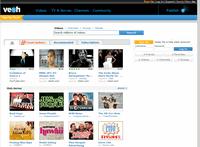
5. Veoh.com

Veoh

Veoh is a video content site, but has made a name for itself through partnerships with several companies to offer TV shows for free. Offering no television available from Hulu, the more popular shows such as The Bang Theory, Big Friends, According to Jim, CSI, and Everwood.

Besides a large number of free television programs, Veoh also offers submitted content, including video clips funny animations and users.

More: Videos sink the highest resolution quality. Video files can be downloaded and stored on a hard drive for later viewing. User submitted content can be embedded in blogs and websites, shared directly with friends, and stored in a list of personal favorites.

Apr 17, 2015

Make Your Windows PC Boot Faster By Getting Rid of Useless Startup Apps


When the computer starts, you sit and wait a few minutes for all those little programs early in the system tray at the bottom? You should not have to. Of course, you will need a pair of important startup programs, but most people have much more than needed to run - you might not even know that many of your startup applications do, and in this case you certainly do not need them to be connected. These computer programs takes more time to start unnecessarily.

Often these programs are useless bloatware installed by the computer manufacturer, while others have a ride with a variety of programs that you have installed. And probably are not needed at all.

Let's talk about how to do it in Windows 8 and Windows 7 (Windows 7 method will work on older versions of Windows, too).

Side note: If you have any programs that run at startup that you do not use at all, you can uninstall from the Windows Control Panel, instead of stopping to run automatically at startup. The choice is yours.

Windows 8

Speed ​​up the boot process is quite easy in Windows 8, because Microsoft has added a powerful tool that helps you to disable startup programs. Windows 8 boot manager even tells you how much each program slows your boot process, so you can easily disable the worst offenders.

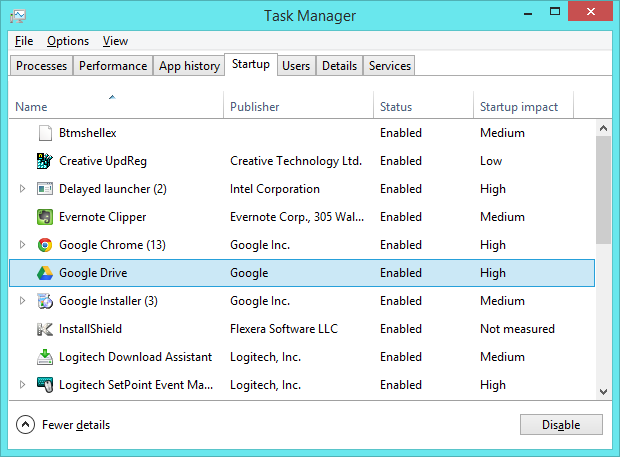
To open this tool, click the right button on the taskbar and select Task Manager. Click More details and click the Startup tab.

From here you can select the start programs you want to disable. Check column Impact Startup - programs with a startup impact "High" slow down most things. If you are not sure exactly what is a program, then right-click it and select Search online research on the program name. This will help you understand exactly what a program, so you can decide if you really want to start at startup. To disable a program from starting automatically, click the right button on it and select Disable.

If you decide you need a program to start automatically, come back and re-enable all programs with disabilities. You can still use the programs you clear - they do not want to load at startup automatically.

Using the Task Manager to manage startup programs on Windows 8.1

On Windows 7

If you still use Windows 7, I have bad news: The oldest operating system does not include any good tool, integrated in the way Windows 8 did. You will need a third party boot manager. I recommend CCleaner. CCleaner includes an excellent boot loader next to your main tool cleaning system that will clean the system caches to free up disk space.

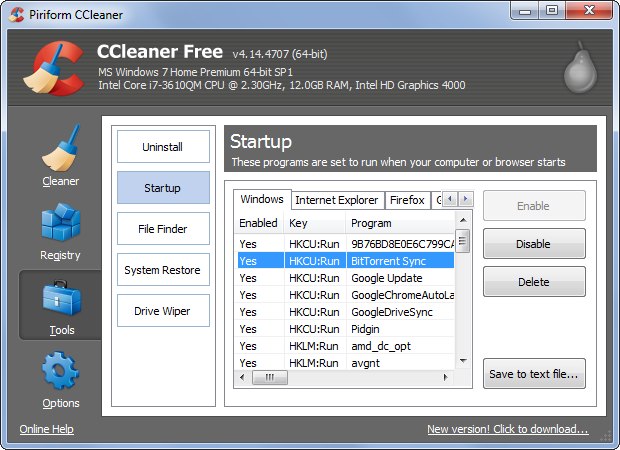
CCleaner offers a paid version, but you do not really need - the free version will do whatever it takes. Install it, run it, click the Tools tab and select "Startup". Use CCleaner boot loader in the same way that you use Windows 8. Select the programs you want to disable, click the right button and select "Disable." Looking for the name of an online program if you do not understand exactly what is or does. Unfortunately, CCleaner not detect how much each startup program slows your boot process.

Using CCleaner to manage Startup programs on Windows 7


If you really want more boot speed - and all about speed when it comes to launch applications, open files and save them - upgrade your computer from a traditional mechanical hard drive to the SSD hard drive. SSDs are much, much faster. Even with a large number of startup programs, an SSD can boot faster than a mechanical hard drive would any startup program at all.